


Getting Started
We are going to use NPM to download the necessary tools to start scaffolding our Vue 3 project.
What is Vue?
Vue is a JavaScript framework used for creating user interfaces. It allows you to break down your application into much smaller components. This allows for more seperation of concerns and an intuitive way to structure an application.
Downloading Vue
To continue, you will need:
- Node.js: https://nodejs.org/en/download/
- npm: https://docs.npmjs.com/downloading-and-installing-node-js-and-npm
Now find a folder you want your Vue 3 project to be located in. Then type this command:
npm init vue@latestYou will be prompted to create a name and select packages for your project. You will be using Vue Router, Pinia, and ESLint. See the image below which options you should select:
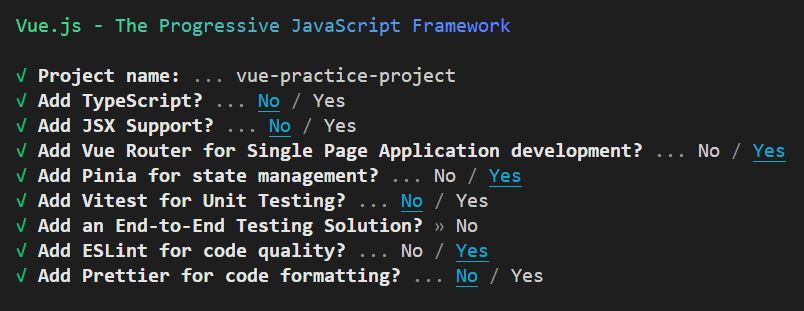
The command-line will show you how to finish installing your project. First, you need to enter the folder of your project:
cd folder-nameThen you need to install the packages you have just downloaded.
npm installNow you can start your Vue 3 project!
npm run devResources for Learning
There are many resources to learn Vue from due to its large community!